Illustrative break-even model. Calculations and assumptions are explained above.


A cloud discount can survive long after the workload that justified it. Picture a procurement lead reviewing an Azure invoice and finding a three-year commitment still on the books after engineering moved the application. The purchase made sense when it was approved. Nobody revisited the assumptions when the architecture changed.
That is the business problem behind the Azure savings plan vs reserved instances decision. Enterprises need lower Azure costs, but they also need room to change regions, resize applications, and retire services. A larger advertised discount can become an expensive obligation when the underlying demand disappears.
For predictable VM usage in a stable region, Azure Reserved VM Instances can offer strong savings. For a dependable level of eligible compute spending spread across changing workloads, an Azure savings plan for compute offers more flexibility. Short-lived or uncertain demand may belong on pay-as-you-go pricing.
This guide explains the differences, shows how to test the economics, and sets out the evidence Finance, Procurement, and IT should review before approving a commitment. The central question is how much future usage your organization can defend with evidence.
An Azure savings plan for compute commits your organization to a dollar amount per hour for one or three years. Eligible usage consumes that commitment at savings plan rates. The benefit can follow eligible usage across services and regions within the selected benefit scope.
Azure Reserved VM Instances apply a discount to matching VM usage for a selected term. Resource attributes and region matter. A reservation therefore fits an application whose expected configuration is well understood. The wider Azure reservations category also includes products beyond virtual machines, so buyers should avoid using “Reserved Instances” as a label for every reservation product.
Microsoft recommends reservations for stable workloads and savings plans for changing environments. The distinction is useful, but a purchasing decision still needs workload-level evidence. An application described as “production” may be scheduled for replacement next year. A development platform may support a steady baseline across many teams even though individual virtual machines change daily.
A one-year term reduces the period your team must forecast. A three-year term deserves a documented view of application retirement, acquisitions, cloud strategy, and expected engineering changes. Ask who can explain why the demand should still exist near the end of that term.
Start with cloud cost optimization across the environment. Remove abandoned resources and check sizing before deciding which remaining costs deserve a commitment. Discount selection comes after the business has agreed on what it still needs to run.
| Decision factor | Reserved VM Instances | Compute savings plan |
|---|---|---|
| Commitment | Matching VM attributes and quantity | Fixed hourly spend |
| Best fit | Stable eligible VM usage | Steady spend across changing eligible compute |
| Region changes | Benefit tied to purchased region | Can follow eligible usage across regions within scope |
| Planning risk | Configuration or demand changes | Total eligible demand falls |
| المصطلح | One or three years | One or three years |
The compute savings plan covers eligible infrastructure charges across services such as Azure Virtual Machines, App Service, Container Instances, Dedicated Host, Container Apps, and Azure Functions Premium. Eligibility depends on the actual product and meter. A familiar service name alone does not establish that every associated charge qualifies.
Storage, networking, and software charges are outside the compute plan. Also, Microsoft now offers a separate savings plan for databases. That makes the old claim that managed database discounts are “reservation-only” inaccurate. Review Microsoft’s savings plan overview to distinguish the two offers and verify eligible services.
For an enterprise approval, split the bill into eligible compute, database services, licensing, storage, networking, and other charges. Attach the proposed commitment to the relevant portion. A discount on VM infrastructure should never be presented as the same percentage reduction in the total Azure invoice.
When reservations and savings plans overlap, Azure applies matching reservation benefits first. It then applies savings plan benefits to remaining eligible usage. Within savings plan allocation, usage with the highest discount percentage receives priority. Buying a plan against usage already covered by reservations can leave less demand available than the purchase model assumes.
Benefit scope also deserves attention. Confirm which resources can receive the discount, which teams fund the purchase, and how shared savings will be allocated. A business unit should understand whether its purchase can benefit another team before Finance signs off on the chargeback arrangement.
A compute savings plan can accommodate changes among eligible services and regions. It cannot protect against a broad decline in eligible spending. A migration that removes compute usage may leave a perfectly valid plan with too little demand to consume it.
Reserved VM Instances have some flexibility. When configured for instance size flexibility, the discount can apply across sizes in the same supported flexibility group, subject to the applicable ratios. That is narrower than unrestricted movement across VM families or regions. Validate the destination configuration before assuming a resize will preserve coverage.
Exchange rules are also changing. Microsoft’s reservation exchange policy identifies February 1, 2027 as the start of restrictions for new reservations covering services supported by savings plans. Earlier purchases retain one final exchange after the change, with stated exceptions. Include renewal dates in the review because renewed reservations are new purchases.
Eligible reservations can also be traded in for savings plans. The new plan’s total commitment must meet or exceed the remaining reservation commitment. A trade-in starts a new term; it does not erase the financial obligation. Savings plans cannot be exchanged back into reservations, and purchases cannot be canceled or refunded under Microsoft’s standard policy.
Ask Procurement to record the applicable terms alongside the approval. Engineering should document the migration assumptions. Neither team should rely on an informal promise that the organization can simply unwind the purchase later.
The useful number is realized savings after unused commitment. A discount percentage describes a rate advantage. It does not tell Finance whether the organization bought more coverage than it could use.
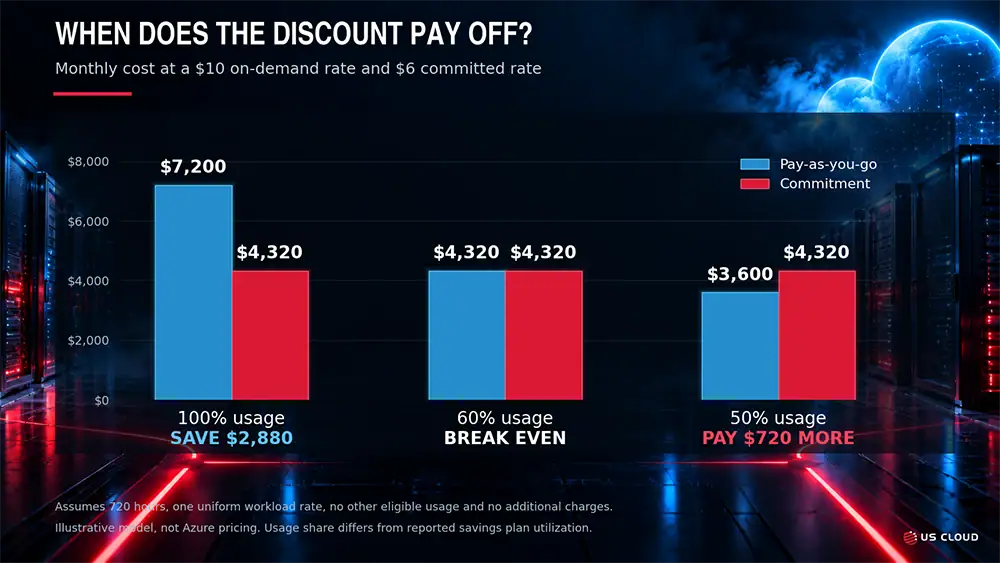
Consider an illustrative workload with a pay-as-you-go cost of $10 per hour and a commitment costing $6 for each hour of the term. Assume a 30-day month, or 720 hours, one uniform usage rate, no other workload available to consume unused benefits, and no additional charges. These figures demonstrate the calculation; they are not an Azure quote.
The commitment costs $4,320 for the month. At 100% usage, pay-as-you-go would cost $7,200, leaving $2,880 in savings. At 60% usage, pay-as-you-go would cost $4,320, exactly matching the commitment. At 50% usage, pay-as-you-go would cost $3,600, making the commitment $720 more expensive.
For this simplified case, the break-even usage share is the committed rate divided by the pay-as-you-go rate: $6 divided by $10 equals 60%. A 40% rate discount therefore requires 60% usage to break even. It does not break even at 40% usage. This usage share is separate from the percentage of a savings plan’s dollar commitment consumed in Azure reporting.
Real environments require an hourly model because usage, eligibility, and rates vary. Unused savings plan commitment expires each hour. A busy afternoon cannot recover value lost overnight. Use the prices available to your account, then compare a base case with a lower-demand case and an earlier-than-planned migration.
Show Finance the total term obligation as well as the monthly payment. An hourly commitment of $10 represents $87,600 across a 365-day year. Paying monthly changes the payment schedule; it does not make the underlying commitment optional each month.
Use four steps to build a purchase recommendation that another reviewer can reproduce.
Leave uncertain growth outside the initial purchase. The team can evaluate additional commitments when demand becomes clearer. An approval process should reward a defensible forecast rather than the highest percentage of spending under commitment.
For workloads that can tolerate interruption, investigate Spot options separately. For nonproduction environments, review Dev/Test eligibility and operating schedules. Compare the operational requirements as well as the price. Cheap capacity is useful only if the workload can run successfully under its conditions.
A purchase needs an operating owner. Finance may approve the obligation, but an engineering change can alter its value months before the next budget review. Establish a route for application teams to flag planned changes before they affect committed demand.
Track utilization, coverage, and realized savings as separate measures. Utilization asks how much purchased benefit is consumed. Coverage asks how much eligible usage receives a commitment benefit. Realized savings compares the relevant total cost with a consistent pay-as-you-go baseline. High coverage alone can conceal an oversized purchase.
Use commitment utilization reporting alongside Azure spending budgets. A budget notification about total cost does not establish whether a particular reservation or savings plan is being consumed efficiently. Review exceptions regularly and set an internal threshold for investigation that reflects the economics of the purchase.
For example, a team might investigate a sustained decline after a deployment change rather than waiting for quarter close. The investigation should identify whether demand fell, resources moved outside scope, eligibility changed, or another benefit now covers the usage. Assign the corrective action to someone who can change the relevant configuration or purchasing plan.
Allow for billing data adjustments before treating an apparent anomaly as final. Microsoft describes a sliding allocation window of up to 48 hours for savings plan benefits. Use mature usage records when reconciling a disputed result, and preserve the supporting export so Finance and Engineering review the same data.
Azure rate optimization addresses only part of the enterprise Microsoft budget. Support deserves its own review, especially when a Unified Support renewal is approaching. Keeping those evaluations connected helps Finance understand total spending while preserving clear assumptions for each savings opportunity.
A smaller Azure invoice does not establish what your next support quote will be. Review the agreement, calculation basis, coverage, and commercial terms. Likewise, a proposed support saving should not be counted as an Azure infrastructure discount. Keep separate baselines so the business case does not count the same benefit twice.
About six months before renewal, begin a comparison of US Cloud and Microsoft Unified Support and document the services your organization needs. If renewal is closer, narrow the review to the evidence required for approval: workload coverage, response commitments, escalation ownership, exclusions, and transition responsibilities.
Include practical questions about cost-related incidents. Who will investigate unexpected usage? What billing detail will the engineers need? Which actions remain with Microsoft or the billing partner? Who owns follow-up until the issue is resolved? Confirm those boundaries in the proposed support scope.
US Cloud provides an independent Microsoft enterprise support alternative. Review its Microsoft support services alongside your technical and procurement requirements. Engineering location alone does not establish compliance; validate access controls, contractual obligations, and data-handling requirements for your environment.
To discuss your support requirements and renewal priorities, talk to a US Cloud expert. Bring the current support scope, renewal date, and unresolved operational concerns so the conversation can address a concrete comparison.
Reserved VM Instances are worth evaluating when eligible usage, configuration, and region are predictable. Compare the actual rate and expected usage over the whole term. Stability should come from the application roadmap and usage history, not simply a “production” tag.
Yes. Reservations apply first to matching usage, followed by savings plan benefits for remaining eligible usage. Model the combined portfolio before buying so the same demand does not justify two separate commitments.
A compute savings plan does not cover managed database charges. Microsoft offers a separate database savings plan. Check the specific database service and meter rather than carrying an older reservation-only assumption into a new purchase.
A savings plan does not guarantee capacity. Reserved VM Instances should also not be treated as a capacity guarantee; capacity priority is distinct from a guarantee. Where guaranteed VM capacity matters, evaluate Azure’s separate on-demand capacity reservation capability and its conditions.
Remove avoidable usage, confirm the workload roadmap, and reconcile existing benefits. Then document a conservative purchase amount, a downside scenario, and the people responsible for reviewing the result. Those records give the next budget reviewer something more useful than an advertised discount.