
دعم Microsoft للمؤسسات
دعم Microsoft من طرف ثالث
Microsoft Unified Support Alternative for AWS End-Customers.

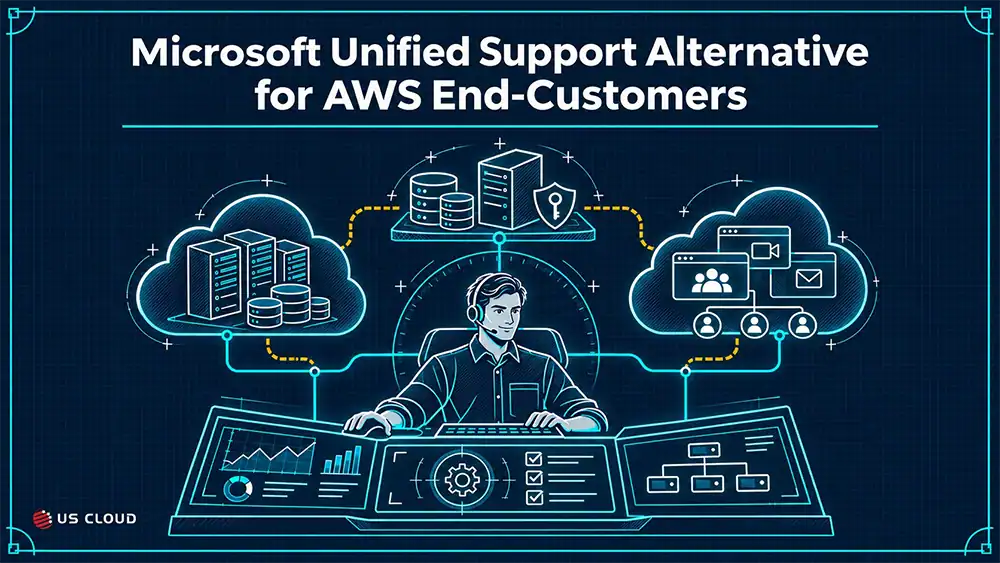
Picture a manufacturer that moved its ERP back end to Amazon EC2 three years ago. SQL Server runs on Windows Server instances in an Always On availability group. Two domain controllers sit in the same VPC and replicate with the sites still on premises. Email, Teams, and SharePoint live in Microsoft 365, and every sign-in runs through Entra ID. The Microsoft Unified Support renewal lands on the IT director’s desk in February.
The renewal quote assumes the support model the company bought when everything sat in its own data center. The environment no longer looks like that. So the practical question is which support arrangement fits the environment the team runs today, and who picks up the phone when something breaks between AWS and Microsoft.
This post walks through how I would evaluate a Microsoft Unified Support alternative for AWS customers, one workload at a time, before anyone signs a renewal.
ملخص تنفيذي
- Coverage validation: Map each workload to a support route. US Cloud can troubleshoot Microsoft software running on AWS. If the fault lies in an AWS service, your team opens the case under its AWS contract.
- Incident ownership: Name one owner for incidents that cross AWS infrastructure, SQL Server, identity, and the application layer.
- Escalation access: Confirm in writing how a case reaches Microsoft engineering, who opens it, and who owns it afterward.
- Total cost: Compare current and proposed arrangements on equivalent scope. Keep retained AWS support in the math and keep labor estimates separate from cash.
- Transition readiness: Two dates sit close to most renewal windows. AWS retires several legacy support plans on January 1, 2027, and Windows Server 2016 reaches end of support on January 12, 2027.
AWS Changes the Support Question
When Microsoft workloads ran in your own data center, the support chain was short. The hardware vendor owned the box, Microsoft owned the software, and your team sat in the middle. On AWS, a third party owns the hypervisor, the storage, the network fabric, and in some cases the management layer of the database itself. A slow query might be a missing index. It might also be an EBS volume that ran out of burst credits. Your support model has to handle both answers.
This kind of mixed environment is now normal. Flexera’s 2026 State of the Cloud survey of 753 cloud decision-makers found that 73% of organizations run hybrid estates, up three points from the prior year. In the same survey, 83% of respondents run some or significant workloads in AWS, and 79% do the same in Azure. Flexera also observed that many organizations end up with complex environments “by happenstance rather than by design.” An acquisition brings in a second cloud. A department buys a SaaS tool. A few years later, the renewal team inherits the result.
Those figures describe cloud adoption broadly. They don’t tell you what your Microsoft dependencies look like on AWS, and no survey can. One AWS customer runs a handful of Windows file servers. Another runs a large SQL Server estate, Exchange Server on EC2, and hybrid identity through Entra Connect. Both would describe themselves as “on AWS,” and they need very different support coverage.
That is why an AWS-centered environment deserves a workload-specific renewal review. The infrastructure decision and the Microsoft support decision were probably made by different teams in different years. They need to be evaluated together now.
What this means in practice: Stop treating “Microsoft support” as one line item. It is a set of support routes, one per workload, and each route has its own coverage terms.
Map Your Microsoft Dependencies
Start with an inventory. A spreadsheet is fine. For each Microsoft dependency, record five things:
- Product and version. Windows Server 2016, SQL Server 2019 Enterprise, and so on.
- Hosting location. EC2, a managed AWS service, on premises, or Microsoft SaaS.
- Licensing model. License Included through AWS, or bring your own license (BYOL).
- Business criticality. What stops working if this goes down, and who notices first.
- Current support route and internal owner. Who you call today, and who on your team owns the outcome.
Cover the obvious ones first: Windows Server, SQL Server, and Active Directory. Then keep going. List the .NET applications and the IIS servers that host them. List Microsoft 365 and Entra ID. Look for the integrations people forget, such as an Entra Connect sync server running on EC2, an SSIS package that pulls from Amazon RDS, or a file share on Amazon FSx for Windows File Server that a line-of-business application quietly depends on.
Pay close attention to where SQL Server runs. Self-managed SQL Server on EC2 means your team, or your support provider, owns the operating system, the SQL Server instance, patching, backups, and high availability. Amazon RDS for SQL Server shifts host maintenance and much of the backup work to AWS, and in exchange it limits what you can change at the instance level. Those are different support problems. A deadlock investigation looks about the same in both places. A Windows Server Failover Cluster that won’t come online is your problem on EC2, while the Multi-AZ failover mechanism on RDS belongs to AWS.
The licensing column matters more than it looks. As the next section shows, AWS treats License Included and BYOL software differently when it comes to support. Some products only come one way. AWS’s FAQ states that it sells only Windows Server and SQL Server licenses for use on EC2, so Exchange Server, SharePoint Server, and other Microsoft server products running on EC2 are customer-licensed by definition.
Buyer test: Can every critical dependency be mapped to a documented support route? If a row says “we’d call someone,” that row needs work.
Check What AWS Already Covers
AWS does support Microsoft software, and it has for a long time. The AWS and Microsoft FAQ says AWS Support has supported Windows-based EC2 instances since 2008 and that AWS holds a Premier Support agreement with Microsoft. For customers on the Business or Enterprise support tier, AWS Support can work directly with Microsoft support engineers on issues involving Windows Server, SQL Server, or Windows desktop through Amazon WorkSpaces. AWS also says there are no regional restrictions on that benefit.
That is real coverage, and it has boundaries. The FAQ is specific about four of them:
- License Included versus BYOL. Microsoft products bought with an AWS service, such as SQL Server License Included on EC2 or RDS, are covered under your AWS Support agreement. For software you didn’t buy through AWS, AWS Support may help with issues related to AWS services and, with your permission, work with Microsoft on the AWS-related part of the problem.
- End of support. Microsoft products past their end-of-support dates are excluded from the expanded AWS and Microsoft support offering. AWS says its support plans will still take technical cases on those products, but the joint Microsoft path goes away. Windows Server 2016 reaches end of support on January 12, 2027.
- No replacement for Microsoft support. AWS states that the expanded agreement does not replace a direct Microsoft support agreement. Issues with your Microsoft applications that are separate from AWS services should go through your own Microsoft support relationship.
- Permission before sharing. AWS may ask you to document authorization before it shares your case details with Microsoft.
There is one more wrinkle. The FAQ still refers to the “Business or Enterprise tier,” but AWS has restructured its plans. According to the AWS News Blog, customers on Developer Support, Business Support (classic), and Enterprise On-Ramp keep their current level of support through January 1, 2027. The current lineup is Business Support+, Enterprise Support, and Unified Operations. If your Microsoft coverage depends on your AWS tier, get written confirmation that the Microsoft escalation path carries over to the plan you will be on after that date.
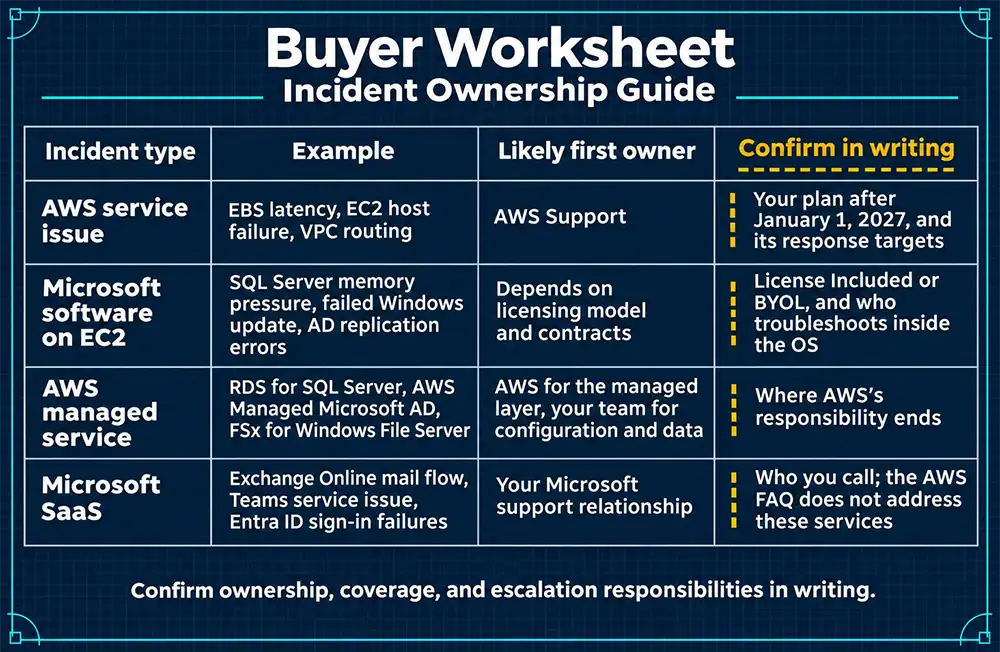
With those rules in hand, separate four kinds of incidents, because each one routes differently. Use the worksheet below with your actual plan, not the plan you think you have.
That last row deserves attention. The AWS FAQ discusses Microsoft 365 only in the context of licensing Microsoft 365 Apps on WorkSpaces. It says nothing about support for Exchange Online, Teams, SharePoint Online, or Entra ID. For most enterprises those services carry more daily business risk than any single EC2 instance.
Buyer test: What is already covered, and what needs written clarification?
Name the Incident Owner
Hypothetical scenario: The following example is illustrative. It is not drawn from a specific customer.
At 9:40 on a Monday morning, users of an order-management application hosted on EC2 start reporting timeouts. The application log is full of SQL timeout exceptions. Some users also can’t sign in, while others can. The help desk opens a ticket, and four teams start looking.
- CloudWatch shows the SQL Server data volume, a gp2 EBS volume, at zero burst balance with a climbing queue length. A weekend index rebuild drained the credits.
- The SQL Server error log shows error 833, which means I/O requests are taking longer than 15 seconds to complete. Wait statistics are dominated by PAGEIOLATCH waits.
- One domain controller on EC2 is logging Kerberos pre-authentication failures (event ID 4771). Its clock has drifted past the default five-minute Kerberos tolerance because its time source was misconfigured after a rebuild.
- Some application servers are hitting the drifted domain controller and throwing “Cannot generate SSPI context” when they connect to SQL Server.
That is two unrelated problems and one outage. The storage issue causes the timeouts, and the time drift causes the sign-in failures. Each team can prove its own piece. Without one owner, each team also has a reason to wait for the others to finish.
Somebody has to own four jobs from the first minute:
- Lead diagnosis. Pull the evidence from every layer into one timeline, so the storage and identity problems get separated instead of blamed on each other.
- Open vendor cases. Open the AWS case for the EBS volume and, if needed, the Microsoft case for Kerberos or SQL Server, with the right severity and the right evidence attached.
- Update stakeholders. Give the business one status, on a schedule, from one person.
- Validate recovery. Confirm that queries complete, sign-ins succeed across every domain controller, and the fix holds through the next index maintenance window.
This kind of tangle is becoming the norm. In its 2026 Annual Outage Analysis, Uptime Institute expects failures to increasingly come from “complex interactions between systems, including software, networks, and external dependencies.” The cost is real. In Uptime’s 2025 annual survey, 57% of respondents said their most recent major outage cost more than $100,000, and one in five said it cost more than $1 million. Those figures cover IT and data center outages broadly, not Microsoft workloads on AWS. They still show what an hour of finger-pointing can cost.
The ownership matrix below is the in-text visual for this section. Fill it in for your own top five workloads before the renewal conversation.
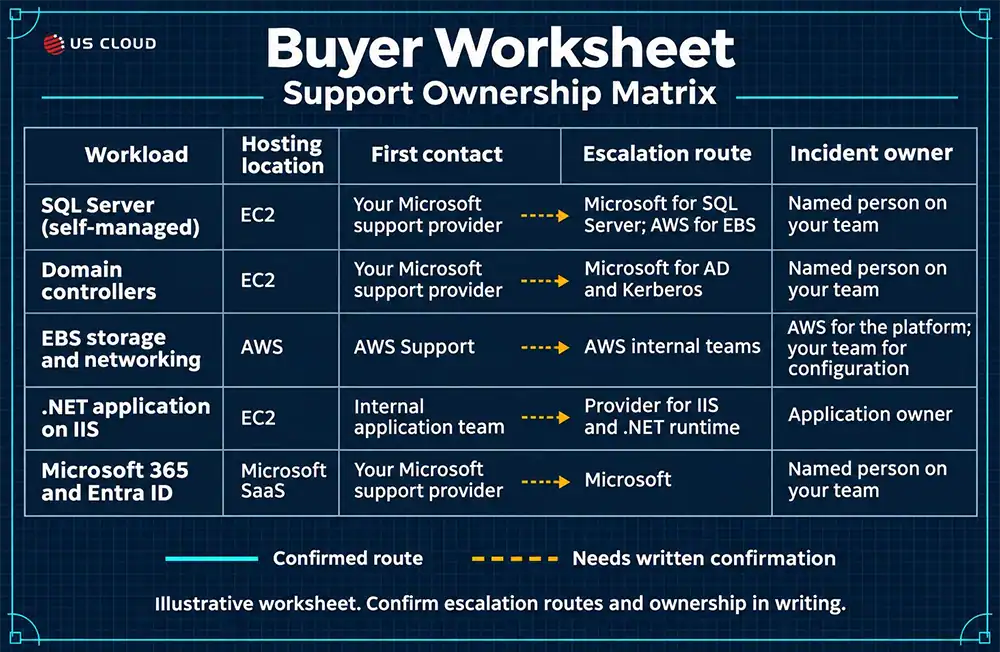
Add two items to your runbook now. First, pre-approve AWS to share case details with Microsoft, since AWS may ask for documented authorization before it does, and that should not hold up a Sev 1 at 2 a.m. Second, write down who can open a severity 1 case with each vendor, along with account numbers and contract IDs.
Buyer test: Who remains accountable when the cause is uncertain? If the answer is “whoever finds it,” you don’t have an owner.
Test the Unified Alternative
US Cloud supports Microsoft workloads and Microsoft–AWS integrations. Its engineers use the same support practices for Microsoft software hosted on AWS as they do on Azure. Customers keep their Microsoft licensing when they switch to the partner-delivered support model. For an AWS buyer, the first step is to identify which part of each workload the provider can troubleshoot.
Support tiers come up in every one of these conversations, and terminology varies by provider, so ask each one to define its terms. A common breakdown looks like this:
- L2 troubleshooting. Engineers work through known issues, logs, configuration, and documented fixes.
- L3 specialist diagnosis. Senior engineers with deep product knowledge analyze memory dumps, traces, and failures that don’t match a known pattern.
- Vendor engineering, often called L4. Microsoft product engineering handles confirmed bugs, hotfixes, and code-level problems that only the product owner can fix.
The question for any provider is how fast a severity 1 reaches L3, and what happens when it needs L4. Test US Cloud, or any Unified Support replacement, against these requirements:
- Supported products and versions. US Cloud supports Windows Server, SQL Server, .NET applications, Active Directory, Exchange Server, SharePoint, Remote Desktop Services, and System Center on AWS. Ask which versions your agreement covers, especially if you plan to run Windows Server 2016 beyond January 12, 2027.
- AWS-hosted deployment scope. For self-managed SQL Server on EC2, US Cloud can investigate the database and Windows. If the evidence points to the underlying AWS storage, your team opens an AWS case. For managed services such as RDS, AWS Managed Microsoft AD, and FSx, ask both providers to identify which components they can investigate.
- Time to senior expertise. Ask for two commitments in writing. How quickly will someone respond to a critical incident, and when will a senior engineer start troubleshooting?
- Severity handling. Describe what a production outage would stop at your company. Ask how the provider assigns severity, staffs the case after hours, and sets the update schedule.
- Escalation routes. US Cloud documents an escalation SLA for Microsoft escalations in its contracts. US Cloud can escalate Microsoft product issues directly to Microsoft and coordinate with both vendors when needed. Ask who updates your team while Microsoft investigates.
- Access controls. Agree on how engineers will access the affected systems, who authorizes access, and how your team can audit the work.
- Exclusions. A fault in a native AWS service goes through your AWS support contract. Get the remaining exclusions in writing, including how the provider handles Microsoft SaaS outages.
Then ask the provider to demonstrate the path. Hand over the hypothetical scenario from the previous section and ask for a walk-through: who answers, what evidence they request, when they tell you to open the AWS case, and when they bring in Microsoft. A credible provider will tell you which parts it owns, which parts belong to AWS, and how it keeps the case moving across both. A provider that claims to own all of it, EBS included, is overpromising.
When Windows 11 desktops in Amazon WorkSpaces stopped detecting monthly and feature updates, US Cloud engineers traced the problem through Configuration Manager (SCCM) logs, Windows Update settings, and Group Policy. They identified the policy blocking updates and guided the customer through a correction, service restarts, and fresh scans. On October 22, 2026, the customer confirmed successful tests on several devices and asked to close the case so its team could carry the fix forward.
A Microsoft Defender for Cloud case took a different path. When onboarding AWS accounts failed across several regions, US Cloud investigated the CloudFormation failures and coordinated escalation to Microsoft. The customer found a workaround that enabled onboarding, and Microsoft confirmed a design limitation.
Some teams need design advice before an incident occurs. For a customer planning how Microsoft Active Directory Certificate Services and AWS Private CA would coexist, US Cloud advised on certificate trust, domain-controller certificates, and how to validate authentication in stages. The engagement covered migration planning.
Buyer test: Can the provider demonstrate the proposed support path?
Can AWS customers replace Microsoft Unified Support?
Yes, if documented coverage fits your workloads. AWS states that its expanded agreement with Microsoft does not replace a direct Microsoft support agreement, so AWS Support alone won’t cover issues inside your Microsoft applications that are separate from AWS services. You still need a Microsoft support relationship. That can be Unified or an independent provider, as long as the provider’s written scope covers what you run. US Cloud supports the Microsoft software in AWS-hosted workloads and can escalate Microsoft product issues. Your AWS contract covers the route for underlying AWS service faults.
Does AWS support Microsoft software?
Yes, within defined limits. Microsoft products bought through AWS as License Included are covered under your AWS Support agreement. For BYOL software, AWS focuses on the AWS-service side of the problem. Products past Microsoft’s end-of-support dates are excluded from the joint AWS and Microsoft offering. The AWS FAQ does not cover support for Microsoft SaaS services such as Exchange Online or Entra ID.
Who handles cases requiring Microsoft engineering?
It depends on the route. If the case starts with AWS and you are on a qualifying support tier, AWS Support can file a case with Microsoft when it finds the problem is due to a Microsoft product or driver, with your permission. Under Unified, you open the case with Microsoft. With an independent provider, the provider escalates under its contract. US Cloud can bring a Microsoft product issue to Microsoft directly. If the underlying fault is in AWS, the customer opens the AWS case and US Cloud can coordinate with both vendors. Whatever the route, confirm who owns the case after it reaches Microsoft.
What should buyers verify before switching?
Verify six things in writing: supported products and versions on AWS, which AWS deployment types are in scope, exclusions, the Microsoft escalation route and who owns the case afterward, response and severity commitments, and the access model for your AWS environment. Then confirm your AWS plan after January 1, 2027, and check whether any workloads run Windows Server 2016 or other products near end of support.
Compare the Full Support Cost
Support cost cannot be evaluated apart from support performance. If a lower-cost option can’t protect the workloads and escalation paths you mapped, it isn’t a better option. Once coverage is confirmed, cost comparison gets much simpler, because you are comparing equivalent scope.
Finance teams increasingly review technology spend as one portfolio. The FinOps Foundation’s State of FinOps 2026 reports that 90% of practitioners manage SaaS spend or plan to in the coming year, 64% manage licensing, and an emerging 28% are beginning to include labor costs. Support contracts belong in the same review. That is my application of the research; the survey didn’t measure support contracts. Flexera’s data points the same direction: 85% of its respondents call managing cloud costs their top challenge, and 78% rank managing software licenses third.
Build the comparison line by line:
Buyer Worksheet: Equivalent-Scope Cost Comparison
| Cost line | Current arrangement | Proposed arrangement | Cash or labor |
|---|---|---|---|
| Microsoft Unified Support fee | Cash | ||
| Independent Microsoft support fee | غير متوفر | Cash | |
| Retained AWS Support plan (after January 1, 2027) | Cash | ||
| Additional Microsoft escalation or per-incident costs | Cash | ||
| Transition work: onboarding, access setup, runbook updates | Cash and labor | ||
| Internal coordination time during incidents (estimated hours) | Labor |
A few rules keep the comparison honest:
- Keep AWS Support on both sides. You will pay for AWS Support either way, so it isn’t a saving. Do confirm the price of the plan you will be on after AWS retires the legacy plans.
- Check for fees outside the base contract. Ask whether escalations, extra incidents, or after-hours work cost more. This is one of the hidden-cost mistakes buyers make when they compare Unified Support competitors.
- Price the exclusions. If a provider excludes something you need, the cost of covering it elsewhere belongs in the proposed column.
- Keep labor separate from cash. Fewer hours lost to vendor ping-pong is a real benefit. It doesn’t reduce an invoice. Mixing the two makes a business case look stronger than it is, and finance will notice.
Contract terms count as part of cost. Over nine years of tracking, Uptime found that third-party providers, including cloud and internet giants, telecommunications firms, and colocation companies, accounted for about two-thirds of publicly reported outages. Uptime says that shift may still require adaptation at a contractual and financial level. For a support buyer, that means response and escalation commitments belong in the signed agreement, where you can enforce them.
Buyer test: Does the business case still work after retained costs and exclusions are included?
Validate Before You Renew
Work backward from two dates: your Unified renewal and your budget lock. If the renewal falls in the first quarter, both January dates above land in the middle of your evaluation. Run the five steps below in order.
- Inventory workloads. Finish the dependency map, including licensing model and support route for every critical row. Assign a named owner to each row.
- Confirm coverage. Get written answers from AWS about your plan after January 1, 2027, the Microsoft escalation path, and how BYOL and end-of-support products are handled. Get written scope, exclusions, and escalation terms from the proposed provider.
- Rehearse an incident. Run the hypothetical scenario as a tabletop exercise with the proposed provider on the call. Uptime reports that failure to follow established procedures remains the leading driver of human error outages. A rehearsal tells you whether the procedure exists and whether people know it.
- Reconcile costs and terms. Complete the cost worksheet on equivalent scope, and match every response commitment to contract language.
- Approve the transition. Require named owners on both sides, provider access tested before go-live, a plan for cases still open with Microsoft, and a confirmed service start date.
Open cases trip up more transitions than anything else. Decide before cutover whether each open Microsoft case will be closed out under the old agreement or handed to the new provider with full history. Ask the onboarding team to document the handoff for each case before you sign.
The fastest way to start is the ownership matrix. Fill it in for your five most critical Microsoft workloads on AWS, and the gaps usually show up in the first hour. If you want a second set of eyes, US Cloud can review the matrix against your current coverage and walk through how a severity 1 case would move in your environment.
AWS Customer Support FAQs