
Microsoft-Support für Unternehmen
Microsoft-Support durch Drittanbieter
How to Reduce Microsoft Support Costs Without Losing.

Before renewing Microsoft Unified Support, IT and procurement leaders need to answer two questions: Can we lower the cost, and can we retain the engineering expertise our business depends on? A credible comparison starts with evidence about support usage, technical coverage, and incident performance.
As you prepare 2027 budgets, use the four steps in this guide to build that comparison. First, audit your current Microsoft support utilization to establish what your contract delivers. Second, benchmark pricing against independent alternatives with comparable coverage. Third, verify L2-L4 engineering credentials and data sovereignty commitments. Fourth, execute a planned transition and monitor performance to confirm that savings hold up in practice.
Each step gives your team evidence for the next decision, from identifying potential savings to confirming who will handle a complex incident. Together, they provide a practical process for reducing Microsoft support costs while protecting engineering access and operational continuity.
Zusammenfassung
- Audit support value before renewal. Review 12 months of tickets, engineering hours, response times, and proactive services to understand what your Microsoft Support contract delivers.
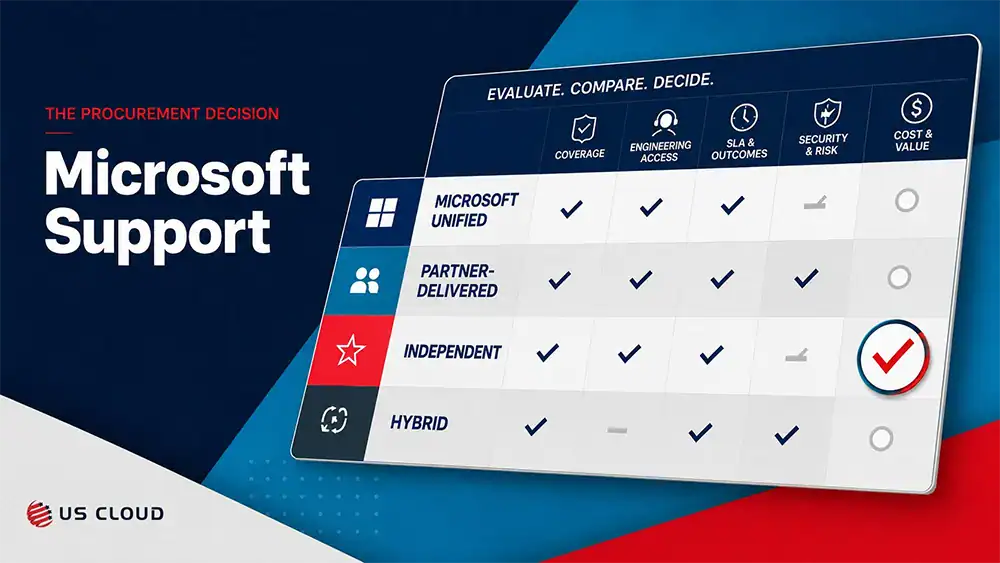
- Compare equivalent coverage. Evaluate included hours, supported technologies, escalation arrangements, additional charges, and service commitments alongside the annual price.
- Verify L2-L4 engineering access. Ask providers to define their support tiers, demonstrate relevant experience, and document how senior specialists become involved.
- Confirm Microsoft escalation responsibilities. Establish which issues require Microsoft, who manages the case, and what access arrangements and costs apply.
- Calculate first-year net savings. Account for transition work, overlapping contracts, additional usage, and any Microsoft Support arrangements you retain.
- Make the decision before renewal pressure builds. Align IT, procurement, finance, and security around the evidence, approvals, and transition requirements needed to move forward
What L2-L4 Access Means
L2-L4 describes escalating levels of technical expertise, but providers may define those tiers differently. Ask each provider to explain who handles complex incidents, how specialists become involved, and what your contract includes.
- L2 support: Engineers investigate issues beyond routine help-desk troubleshooting, including configuration problems and service errors.
- L3 support: Senior specialists investigate complex failures, recurring issues, and problems that span multiple Microsoft technologies.
- L4 support: Depending on the provider, this may mean its most experienced architects or escalation to the software vendor for product-level investigation. Confirm which meaning applies.
Access to an independent provider’s senior engineers does not automatically mean direct access to Microsoft’s product engineering teams. Issues involving product defects or changes to Microsoft-operated services may require Microsoft’s involvement.
Before signing, request a walkthrough of a complex incident relevant to your environment. Confirm who owns the case, how quickly the appropriate specialist becomes involved, how Microsoft escalation works, and whether additional charges apply. Put those commitments in writing so your cost comparison reflects the engineering coverage you need.
Step 1: Audit
Audit Your Current Microsoft Support Utilization
Reducing Microsoft Support costs while maintaining engineering depth starts with a single, honest question: what is your enterprise actually getting for that annual spend? Before you renegotiate or replace anything, you need a clear picture of how your current contract performs against real usage — not the usage your vendor assumed when pricing the deal.
Follow this audit sequence to build that picture:
- Pull your ticket log for the past 12 months and tag each incident by complexity. Identify what percentage genuinely required L2-L4 engineering intervention versus routine administrative tasks a help desk could have resolved.
- Calculate your cost by resolved high-severity incident by dividing your total annual Microsoft Unified Support cost by the number of high-severity incidents resolved during the same period. Use this figure alongside total ticket volume, engineering hours, and proactive services used to evaluate contract value. It is not an hourly rate or a complete measure of support performance.
- Compare actual response times against your contractual SLAs for critical outages. Document every gap, because deviation data is your strongest negotiating evidence.
- Flag offshore-routed incidents where “unlimited” support translated into queue delays or repeated handoffs rather than direct engineering access. This pattern is a core driver of hidden costs while eroding resolution quality.
- Benchmark utilization rate — enterprises often pay for capacity they never activate. A detailed support contract comparison can help surface exactly where Unified Support underdelivers relative to its price.
This audit converts vague frustration into structured data, setting the stage to make a credible, quantified case for Microsoft Support cost reduction in 2026.
Step 2: Benchmark
Benchmark Pricing Against Independent Alternatives
With your utilization audit complete, you now have the data needed to run a credible cost comparison. Benchmarking third party Microsoft Support against what your enterprise currently pays for Unified Support is the step that gives procurement evidence to compare proposals.
Work through the following benchmarking steps to build a defensible business case:
- Pull your current Unified Support invoice and identify the annual fee as a percentage of your total Microsoft spend. Unified Support is typically priced as a percentage of Microsoft contract value, meaning costs scale automatically as your Azure footprint grows — regardless of whether your support ticket volume does.
- Request fixed-price quotes from independent providers that offer L2-L4 engineering access as a standard feature, not a premium tier unlocked by spend thresholds. A fixed-price model removes the compounding cost risk embedded in percentage-based Unified Support contracts.
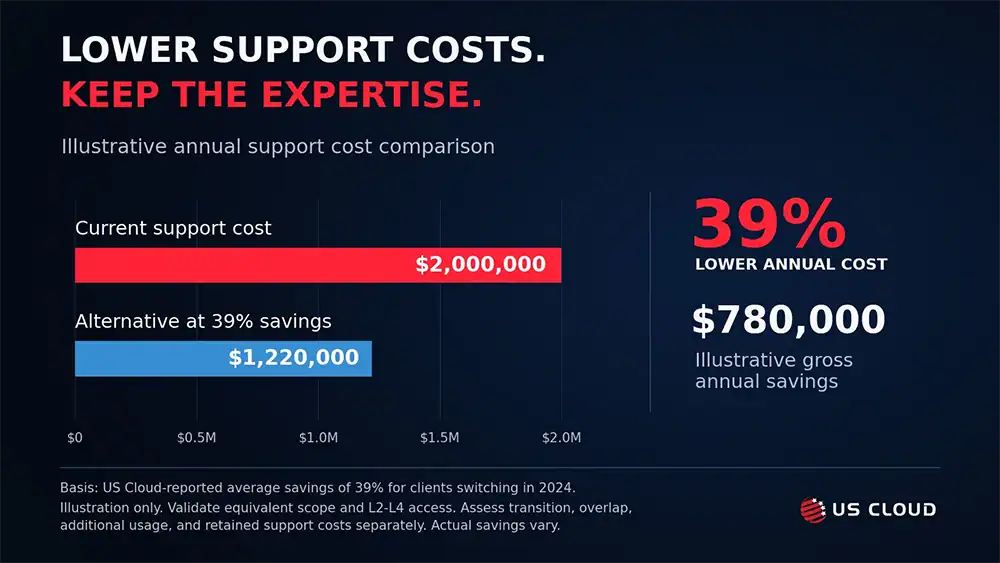
- Calculate the delta between your current annual support spend and the independent provider quote. US Cloud clients averaged 39% savings in Microsoft Support after switching in 2024 — a figure that, applied to a $2M Unified Support contract, represents roughly $780,000 in annual budget recovered while maintaining full engineering depth.
- Evaluate the delivery model behind each quote. Domestic-only engineering tends to reduce escalation hand-offs and supports data sovereignty requirements that global delivery models often cannot guarantee without contractual carve-outs.
- Map L2-L4 availability for each provider against your environment’s complexity, particularly if your infrastructure spans hybrid-cloud and legacy on-premise workloads. Confirm that high-tier engineers are included at the base contract level.
The benchmarking output should answer one question concisely: can you achieve equivalent or superior engineering access while maintaining a materially lower cost structure? In most enterprise comparisons, the answer is yes — and the documentation you produce here becomes the foundation for a formal RFP.
Step 3: Verify
Verify L2-L4 Engineering Credentials and Sovereignty
Pricing benchmarks mean nothing if the engineers behind a quote cannot actually solve your most complex incidents. Before you reduce Microsoft Support costs through a third-party provider, verify that the proposed engineers have the experience your environment requires. Maintaining engineering depth — not just coverage hours — is what separates a sound transition from a costly mistake.
Work through this verification sequence before signing any contract:
- Request documented Microsoft certifications for every engineer tier the provider plans to assign to your account. Certificates should be current, individually named, and available on demand — not aggregated team statistics.
- Confirm domestic-only engineering in writing. Offshore routing is a common hidden variable that introduces data sovereignty risk and compliance exposure, particularly for enterprises operating under ITAR, HIPAA, or FedRAMP frameworks.
- Map the escalation path from L2 through L4 against a realistic incident scenario. A single-hand-off model is the benchmark; multiple transfers signal account management volume over engineering depth.
- Validate 24/7/365 availability at each tier — not just on-call access to a generalist, but guaranteed routing to a senior engineer without a queuing delay measured in hours.
- Probe hybrid-cloud and legacy on-premise competency directly. Present a technical scenario that spans both environments and evaluate whether the response demonstrates real architecture familiarity or surface-level script-reading.
One practical approach is to request a structured proof-of-concept engagement on a non-critical workload before committing to a full contract. This surfaces any gap between a provider’s credentials on paper and their actual incident response behavior.
Step 4: Execute
Execute the Transition and Monitor Performance
With credentials verified and benchmarks in hand, you are ready to execute the actual switch — the phase where planning converts to measurable results. Done methodically, this transition protects engineering access continuity while locking in the cost reduction your audit justified.
Work through these steps in sequence to de-risk the switchover and validate ROI from day one:
- Draft an RFP that mandates engineering standards explicitly. Specify L2-L4 access by name, require US-based engineers for sensitive workloads, and include binding SLA language around initial response and escalation timelines. Vague RFPs produce vague contracts — the more precise your requirements, the more accountable the provider.
- Negotiate a parallel support period. Run the new provider alongside your existing Microsoft Support contract for 30 to 60 days. Route non-critical incidents through the new provider to stress-test their response quality before full cutover.
- Baseline your Microsoft Premier support cost before the transition closes. Document the final annual figure as the benchmark against which all future savings are measured — this becomes the denominator in your ROI calculation.
- Deploy Azure Cost Management to track cloud-related support overhead in real time once the new contract activates. Identify any residual spend tied to legacy escalation paths that should be retired.
- Establish a structured feedback loop between engineering teams and procurement. Schedule 30-day and 90-day reviews where incident resolution data, escalation rates, and engineer quality scores feed directly into a written performance report.
- Formalize exit criteria in the contract before signing. Define the conditions — missed SLAs, degraded engineering access, sovereignty gaps — that trigger a provider review, giving your enterprise leverage throughout the engagement.
A transition executed this way preserves operational stability while surfacing the financial impact quickly. The performance data you collect in the first 90 days will also anchor the broader conversation about enterprise stability.
How to Maintain Enterprise Stability: Key Takeaways
Reducing support costs while sustaining deep engineering access is not a compromise — it is a procurement decision that enterprises can execute with precision when the right framework is in place. The four-step process covered in this guide gives you a repeatable path to do exactly that.
Follow these steps to consolidate your position and protect engineering quality long-term:
- Start with your utilization audit. Prove the business case internally before approaching any vendor. Quantified data is what converts budget conversations into procurement mandates.
- Anchor every benchmark to engineering tier. Support costs only matter in context — confirm that L2 through L4 coverage is included at the base contract level before comparing any figures.
- Verify credentials, not just price. To maintain L2-L4 engineering access at the level your environment demands, validate engineer tenure, escalation depth, and domestic delivery commitments in writing.
- Treat 90-day performance data as a strategic asset. Use it to enforce SLAs, justify ongoing investment, and access our broader enterprise stability metrics year over year.
According to the Gartner Market Guide, the Microsoft Support alternatives market provides institutional authority and significant cost-reduction opportunities for global enterprises — a validation that independent engineering is no longer a workaround but a mainstream enterprise strategy. The decision to move is yours. The framework to do it is here.
Put your next Microsoft Unified Support renewal to the test. Talk to US Cloud about your current costs, required L2-L4 engineering coverage, and transition needs. Request a comparison your IT and procurement teams can use to make an informed decision.
Häufig gestellte Fragen
How can enterprises reduce Microsoft Support costs without losing engineering expertise?
Enterprises can reduce Microsoft Support costs by auditing current usage and comparing providers against the same technical and service requirements. Verify senior engineering availability, workload coverage, escalation ownership, and contractual response commitments before accepting a lower quote. Include transition expenses and additional usage charges in the financial comparison.
What does L2-L4 engineering access include?
L2-L4 generally describes increasingly specialized technical support, but providers define these tiers differently. Ask what each level handles, how engineers are assigned, and whether specialist involvement costs extra. Confirm whether L4 refers to the provider’s senior architects or a separate escalation to Microsoft’s product engineering teams.
Can an independent support provider escalate issues to Microsoft?
An independent provider may offer Microsoft escalation through its established support arrangements. Verify the proposed route, supported products, customer prerequisites, case ownership, and charges before signing. Access to an independent provider’s senior engineers should not be treated as a guarantee of direct access to Microsoft’s product teams or a specific Microsoft resolution time.
Why can Microsoft Unified Support costs rise when ticket volume stays flat?
Microsoft Unified Support pricing is based on historical annual product spending rather than ticket volume alone. Growth in eligible licensing purchases or Azure consumption can therefore affect a subsequent support quote even when support usage remains unchanged. Review the spending baseline, applicable rates, and services included in your renewal proposal.
How should enterprises calculate Microsoft Support savings?
Calculate gross annual savings by subtracting the proposed annual support cost from the current annual cost for comparable coverage. Divide that difference by the current cost to calculate percentage savings. For first-year net savings, also subtract incremental transition expenses, contract overlap, and other costs not already included in the proposed total.
What should buyers verify before switching support providers?
Verify supported workloads, engineer qualifications, severity-based response commitments, Microsoft escalation arrangements, data-handling controls, and pricing terms. The transition plan should identify owners for open tickets, access setup, incident routing, and service acceptance. Set an overlap period only when the operational need, contract timing, and budget justify it.
What if the Microsoft Unified Support renewal is only weeks away?
Prioritize a comparable quote, critical coverage requirements, security review, and a realistic transition assessment. Confirm approval deadlines and contractual notice requirements immediately. If a transition cannot be validated before renewal, use the comparison to inform negotiations and establish a documented evaluation plan for the next available decision window.